
Last Updated Jan 9, 2026
Multi-theme using state machines
Categories: Design
Tags: #TypeScript , #State Machines
For about 7 years, I was convinced I had landed on the final design for my website. Silly me...
But really, the reason I did this was because I had an idea for an alternate dark theme.
Also, since I wanted to cover multiple things I learned and did for this redesign, I'm breaking this up into multiple blog posts. And, unfortunately, since I'm covering all of this top-down, that means the reason for this whole thing had to be covered in my next blog post (which is finally up).
Overview
This redesign brings a slightly simplified layout, new themes, and a new theme switcher using dropdowns (the old one was just a rotating toggle button like what Laravel does on their docs).
The reason for dropdowns is to allow flexibility needed for more than 2 themes to coexist. Really, a personal blog site doesn't need more than 1 theme at all (or 2 if you want to support user preferences for light and dark), but I'm doing this for fun.
Also, I'm not using a UI component library for this yet, but I might later just for the sake of letting me show icons next to the labels (and maybe avoid the ugly default Select UI)...

New themes
The old light theme was completely white with dark accents. The new one uses multiple light greys for a subtle layering effect, nothing fancy.
The new default dark theme is the one named "Cybernetic". At first it was just going to be the base colors and accents, but I had this idea for a glowing computer circuit trim that I really wanted.
For the alternate dark theme, see my next post: A fun, unintrusive scroll animation.
How the switcher works
What I have is a rough state machine implementation.
My idea was to separate "mode" (what your browser wants: system default, light, dark) from "theme" (how it appears), create separate state machines for both, and let them handle their own transitions by each extending base state classes. The child state classes simply override the method that would transition to that same state to prevent the transition.
This article will use some trimmed-down samples. But the full code can be found at the project repo:
- TS files for behavior described below
- Select Component class, markup, and component usage.
For example, the DisplayMode classes would look like this:
export class DisplayMode {
	/* helper methods etc. */
	toSystemDefault(): SystemDisplayMode { /* transition logic */ }
	toLightMode(): LightDisplayMode { /* transition logic */ }
	toDarkMode(): DarkDisplayMode { /* transition logic */ }
}

// each concrete display mode would override the related transition method like this:
export class SystemDisplayMode extends DisplayMode {
	toSystemDefault(): SystemDisplayMode {
		console.warn('Mode is already set to system default.')
		return this
	}
}

//
Transitions are managed via controller classes like this one:
export class DisplayModeController {
	init() {
		DisplayThemeController.init()

		// register system update handlers
		// listen for external display mode change events

		this.initDisplay()
	}

	initDisplay() { /* resolve/init current display mode, theme, and their dependencies */ }

	updateMode(event: DisplayModeUpdateRequested): void { /* transition display mode */ }
}
Since there are separate light and dark themes, and especially since there's more than 1 dark theme, themes need their own states. They're also managed via their own controller and resolver.
Since there are only 2 dark themes, 1 is the default and the other sort of inherits from it, including in the CSS. This project uses Tailwind CSS v4, so the dark: class prefix is used to apply dark mode styles. The default dark theme uses these.
The secondary dark theme will inherit these, but it also gets its own dark2: prefix that overrides dark defaults. Tailwind calls this a custom variant, and it's defined like this in "app.css":
@custom-variant dark (&:is(.dark *)); /* default dark variant */

@custom-variant dark2 (&:is(.dark2 *));
For controlling styles, since we're dealing with a default dark theme and a dependent theme, transitioning to the default dark theme involves adding the .dark class and removing the .dark2 class from <html>:
document.documentElement.classList.add('dark') // adds dark class, if not present
document.documentElement.classList.remove('dark2') // removes dark2 class, if present
And transitioning to the secondary dark theme involves making sure both classes are applied.
document.documentElement.classList.add('dark') // adds dark class, if not present
document.documentElement.classList.add('dark2') // adds dark2 class, if not present
Transitioning to the light theme simply requires removing both.
Note: I don't think this is a "correct" way to do state machines. When using classes, my understanding is that the parent classes provide stub methods for each transition, and the stub methods fail. It could be something like this:
interface ExampleState {
	toStateOne(): ExampleState
	toStateTwo(): ExampleState
	toStateThree(): ExampleState
}

class ExampleParentState {
	toStateOne(): ExampleState {
		console.error('Unable to transition to state one.')
		return this
	}

	toStateTwo(): ExampleState {
		console.error('Unable to transition to state two.')
		return this
	}

	toStateThree(): ExampleState {
		console.error('Unable to transition to state three.')
		return this
	}
}
Each child state is then supposed to define what transitions are available to it by overriding the parent methods:
class ExampleStateOne {
	toStateTwo(): ExampleState {
		const newState = new ExampleStateTwo()

		// other transition requirements

		return newState
	}
}

class ExampleStateTwo {
	toStateThree(): ExampleState {
		const newState = new ExampleStateThree()

		// other transition requirements

		return newState
	}
}

// and so on...
This is basically what I did with my blog post status (code here).
But since this feature's requirements are extremely simple (each state can transition to any other state, just not its own), it was easier to invert this by defining the transitions on the parents and disabling the 1 method for each state to transition to itself (which is always invalid).
Note 2: I realize the use case for my blog posts is also stupidly simple right now, but I did it that way when I was trying out a simple way to learn state machines. It's better, but probably still overkill for my blog...
"Restoring" the correct mode and theme
This part happens every page load by calling an init method:
// in app.ts
window.addEventListener('load', function () {
	const controller = new DisplayModeController()
	controller.init()
})

// appearance/DisplayModeController.ts
export class DisplayModeController {
	init() {
		DisplayThemeController.init()

		// this only responds to a system preference change
		window
			.matchMedia('(prefers-color-scheme: dark)')
			.addEventListener('change', e => {
				if (localStorage.getItem(modeStorageKey) !== 'system') return

				if (e.matches) {
					DisplayModeResolver.resolve().toDarkMode()
					return
				}

				DisplayModeResolver.resolve().toLightMode()
			})

		document.addEventListener(
			DisplayModeUpdateRequested.name,
			this.updateMode.bind(this),
		)
		document.addEventListener('livewire:navigated', this.initDisplay.bind(this))

		this.initDisplay()
	}

	// other controller methods...
}
DisplayThemeController.init() is called first to try to resolve the last theme used and ensure any related state is correct. This comes first because having this correct state is important for both theme and mode transitions to work.
At init and anytime a transition happens, the DisplayTheme and DisplayMode classes will update local storage. Using DisplayMode as an example:
export class DisplayMode {
	// other class methods above...

	updateStorage(value: string): this {
		localStorage.setItem('theme', value)

		return this
	}
}
The updateStorage method is simply for setting the new storage value to restore from later. The DisplayTheme class also has this.
*As an aside, "display mode" is what's expected in other theme switchers. So, confusingly, the local storage key needs to be "theme". Since this project uses Filament for its admin panel, which also expects this. So using this key is important to keep the Filament theme and Frontend mode/theme in sync.
DisplayTheme uses a separate key "displayTheme".*
On all transitions, the DisplayMode and DisplayTheme classes will also broadcast the change:
export class DisplayMode {
	broadcast(value: string): DisplayMode {
		document.dispatchEvent(new DisplayModeUpdated(value))

		return this
	}

	// other methods below...
}
This allows anything that depends on the current display state to listen for updates, such as the dropdown at the top. The dropdowns are simply Blade components with a sprinkle of Alpine.js to handle listening for transitions and also broadcasting intents to transition between modes and/or themes.
<x-nav.select-list-nav-item
	id='display_mode'
	name='display_mode'
	event-key='mode'
	dispatch='display_mode.update'
	listen='display_mode.updated'
>
	<x-slot:label>Display Mode</x-slot:label>
	<option value='system'>System Default</option>
	<option value='light'>Light Mode</option>
	<option value='dark'>Dark Mode</option>
</x-nav.select-list-nav-item>
The select component can be found here:
Bonus: a bit more reusability
When I created this new dropdown menu component for the theme settings, I reused a CSS checkbox trick I had used for the old mobile menu.
After creating the new dropdown menu component, I was able to expand it a bit so it could also replace the old menu. Now it has a mode that can show all menu items on larger screens linearly if it's set to (in the case of the top menu) or always show them collapsed into a toggleable dropdown menu (in the case of the theme settings).
If you look at the site on mobile, you'll see them side-by-side, just with 2 different icons.
This behavior is controlled in the Dropdown component:
// app/View/Components/Nav/Dropdown.php
class Dropdown extends Component
{
	public string $toggleClasses;
	public string $wrapperClasses;
	public string $containerClasses;

	public function __construct(
		public bool $mobileCondense = false,
	) {
		// configure default classes
		// configure CSS classes depending on $this->mobileCondense
	}

	public function render(): View|Closure|string
	{
		return view('components.nav.dropdown');
	}
}
Then in the markup, apply mobile-condense to set it to only condense to a popup on mobile:
<x-nav.dropdown mobile-condense>
	<x-slot:toggle>
		<input type="checkbox" id="menu-toggle" name="menu-toggle" class="hidden absolute top-0 left-0 -z-50">

		<label for="menu-toggle">
			{{-- menu icon or text --}}
		</label>
	</x-slot:toggle>

	{{ $slot }}
</x-nav.dropdown>
Here's the live code:
Extra things learned/relearned
Building all of this both taught me some other new things and brought some past learnings back.
Pulse animations
If you have graphics you want to use in animations, pulse animations are pretty dang easy to pull off — and, yes, I'm biased towards neon, so I just think they look cool. 😎
You can find the graphic I used for the pulsing circuits on my new credits page (also linked in the footer).
Circular reference issues in JS/TS modules
My first implementation of the theme and mode stuff above was in vanilla JS and (I'm sure you'll cringe at this) it was all jammed together in 1 file. Naturally, this meant some issues were hidden.
Since I was already set up for TS, I decided to make each class its own TS class module. I quickly discovered that the way I was doing imports was causing circular references.
I'm pretty sure this is because everything in JS is already an object.
For example, in PHP, you can import classes and use them as types all day long between sibblings, resolvers/factories etc.
class ParentClass {}
// ---
class ChildClass extends ParentClass {}
These can each have typed properties or methods that use each other as the type and it won't be an issue. But this is because these are uninstantiated class definitions.
(come back to this to confirm) In JavaScript, class definitions are just syntatic sugar for constructor functions. And like everything else in JS, they're already live objects of their own once parsed. You can create new instances of them, but the original uninstantiated ones have live properties.
This applies in TypeScript when using classes or other objects as types, because they're live at time of import. So, for example, I couldn't have each parent class (theme or mode) in its own file, each of their children in their own files, and then reference these classes within each other's files.
To work around this issue (at least for now), I ended up colocating the children with their parents. This is something that's unconventional in PHP projects due to standards for PHP module autoloading, but it's easy to do in JS modules due to how JS imports work.
Probably the correct way to fix this issue is a different state machine implementation, but I'll cross that bridge later.
Noisy backgrounds are noisy
Most projects I work on now don't have too much background noise. For the most part, I'm just throwing a dark overlay on a photo and dropping white text on top.
With this glowing pulse effect in the background, it wasn't a big deal for larger screens. But it was difficult to make look ok on mobile — and, to be fair, I probably still have a little more to do there.
The best I could do involved a combination of wrapping even more elements in backgrounds and curved borders and reducing the intensity of the pulse animation on mobile.
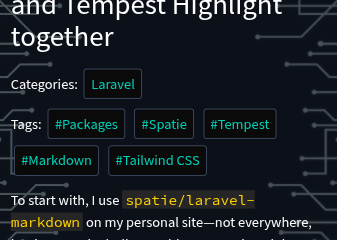
Of course, this screenshot was taken before I fixed this issue for the body of my blog posts, but it should be good now. 😅
Wrapping up
I still have some quirks of theming to work through, especially since the standard is to support exactly 1 theme each for light and dark mode. But all in all, learning how to do all of this has been a blast.
6 months ago
JSn1nj4 pushed to master at JSn1nj4/ElliotDerhay.com
6 months ago
JSn1nj4 pushed to develop at JSn1nj4/ElliotDerhay.com
6 months ago
JSn1nj4 pushed to develop at JSn1nj4/ElliotDerhay.com
6 months ago
JSn1nj4 pushed to master at JSn1nj4/ElliotDerhay.com
6 months ago
JSn1nj4 deleted jsn1nj4/jsn-335-refresh-view-live-button-url from JSn1nj4/ElliotDerhay.com